
Type Japanese using your English keyboard with automatic Hiragana and Katakana conversion.
Japanese Virtual Keyboard Online – Free Hiragana & Katakana Typing Tool
Looking for a fast and easy Japanese virtual keyboard online? This free Japanese typing tool allows you to type Hiragana and Katakana using your English keyboard layout. Whether you are learning Japanese, practicing kana typing, writing Japanese vocabulary, or simply searching for a responsive Japanese keyboard online free, this tool is designed to help both beginners and advanced learners.
Unlike traditional Japanese IME software that requires installation, this online keyboard Japanese tool works directly in your browser on desktop and mobile devices. You can instantly convert romaji input into Japanese kana while learning how the Japanese writing system works.
This tool supports:
- ✅ Hiragana keyboard
- ✅ Katakana keyboard
- ✅ ENG keyboard → Kana conversion
- ✅ Dakuten and Handakuten
- ✅ Yōon combinations
- ✅ Small tsu auto typing
- ✅ nn → ん conversion
- ✅ Responsive mobile typing
- ✅ Japanese online IME keyboard behavior
What Is a Japanese Virtual Keyboard?
A Japanese virtual keyboard is an online typing tool that allows users to type Japanese characters using either an on-screen keyboard or an English QWERTY keyboard. Instead of memorizing complex Japanese keyboard layouts, users can type romanized Japanese words such as:
- konnichiwa → こんにちは
- sushi → すし
- katakana → カタカナ
This system is commonly known as:
- Japanese online keyboard hiragana
- Japanese online keyboard katakana
- Japanese online IME keyboard
- QWERTY Japanese keyboard
- Japanese writing generator
Modern Japanese typing systems use intelligent kana conversion technology to transform romaji into Japanese characters automatically.
How Does a Japanese Keyboard Work?
Many beginners ask:
How does a Japanese keyboard work?
Most Japanese typing systems actually use a standard English QWERTY keyboard. Instead of typing Japanese characters directly, users type romaji (romanized Japanese pronunciation), and the system converts it into Hiragana or Katakana.
For example:
| Romaji | Hiragana | Katakana |
|---|---|---|
| sa | さ | サ |
| shi | し | シ |
| kyo | きょ | キョ |
| gakkou | がっこう | ガッコウ |
This is why many learners prefer typing Japanese with English keyboard layouts rather than memorizing a native Japanese hardware keyboard.
How to Use Japanese Virtual Keyboard
If you are wondering how to use japanese virtual keyboard, follow these simple steps:
Step 1 – Choose Input Mode
Select either:
- Hiragana mode
- Katakana mode
Hiragana is mainly used for native Japanese grammar and vocabulary, while Katakana is commonly used for foreign words and names.
Step 2 – Type Using Your English Keyboard
Use your standard English keyboard to type romaji.
Examples:
- ka → か
- shi → し
- su → す
- ta → た
The system automatically converts romaji into kana in real time.
Step 3 – Use Dakuten and Handakuten
You can modify kana sounds using:
- ゛ Dakuten
- ゜ Handakuten
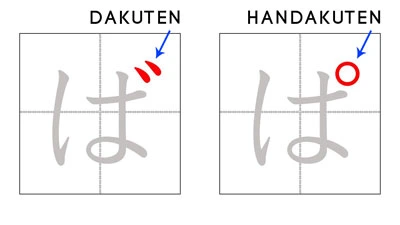
Examples:
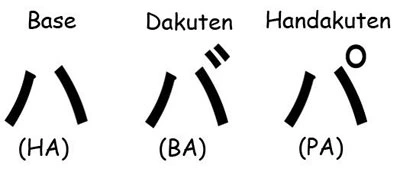
| Base | Dakuten | Handakuten |
|---|---|---|
| か | が | – |
| さ | ざ | – |
| は | ば | ぱ |
Step 4 – Use Yōon Combinations
Yōon combinations create contracted sounds such as:
- きゃ (kya)
- しゅ (shu)
- ちょ (cho)
This tool supports both Hiragana and Katakana Yōon combinations.
Step 5 – Use Small Tsu Auto
Small tsu (っ / ッ) is automatically generated when double consonants are detected.
Examples:
- gakkou → がっこう
- kitte → きって
Step 6 – Use nn → ん
Typing:
- nn → ん
This is one of the most important Japanese IME typing rules.
Japanese Keyboard Layout Explained
Many learners search for:
- japanese virtual keyboard layout
- what is the standard japanese keyboard
- how to read japanese keyboard
A traditional Japanese keyboard usually contains:
- English QWERTY layout
- Japanese kana labels
- IME conversion keys
However, most Japanese users today type using romaji input because it is faster and easier to learn.
This online keyboard follows the same modern Japanese IME typing approach.
Hiragana vs Katakana
Hiragana
Hiragana is the fundamental Japanese phonetic writing system used for:
- grammar particles
- native Japanese words
- verb endings
- basic vocabulary
Examples:
- こんにちは
- ありがとう
- さくら
Katakana
Katakana is mainly used for:
- foreign words
- loanwords
- scientific names
- emphasis
Examples:
- コンピューター
- スーパー
- ゲーム
Why Use an Online Japanese Keyboard?
Many learners search for:
- japanese keyboard online google
- japanese online keyboard kanji hiragana katakana lexilogos
- hiragana japanese online keyboard lexilogos
- katakana japanese online keyboard lexilogos
While those tools are useful, this keyboard focuses on:
- better mobile responsiveness
- clean modern UI
- QWERTY romaji conversion
- lightweight performance
- AdSense-friendly UX
How to Get Japanese Keyboard on Your Device
If you want to know:
- how to get japanese keyboard
- how to switch to japanese keyboard
- how to turn on the virtual keyboard
You can either:
- Install Japanese IME on Windows, macOS, Android, or iPhone, or
- Use this Japanese virtual keyboard online directly in your browser
Using an online Japanese keyboard is often easier for beginners because it requires no installation.
Japanese Keyboard Not Working?
If your Japanese keyboard is not working correctly:
- refresh the page
- switch input mode again
- disable browser extensions
- clear browser cache
- check mobile keyboard permissions
This tool is optimized for:
- Chrome
- Safari
- Firefox
- Edge
- Android browsers
- iPhone Safari
Learn More Japanese on KanjiLingo
To improve your Japanese reading and typing skills, explore more lessons on KanjiLingo:
- Hiragana & Katakana Chart
- Basic Kanji List
- JLPT N5 Kanji
- Japanese Numbers Kanji
- Japanese Vocabulary for Beginners
- Kanji Finder Tool
This Japanese virtual keyboard is designed to help learners type Japanese easily using an English keyboard. Whether you are studying Hiragana, Katakana, Japanese vocabulary, or practicing romaji conversion, this tool provides a fast and responsive typing experience across desktop and mobile devices.
Because the keyboard supports:
- ENG keyboard → kana
- Dakuten
- Handakuten
- Yōon
- Small tsu auto
- nn → ん conversion
It behaves similarly to a lightweight Japanese IME keyboard while remaining simple and beginner-friendly.